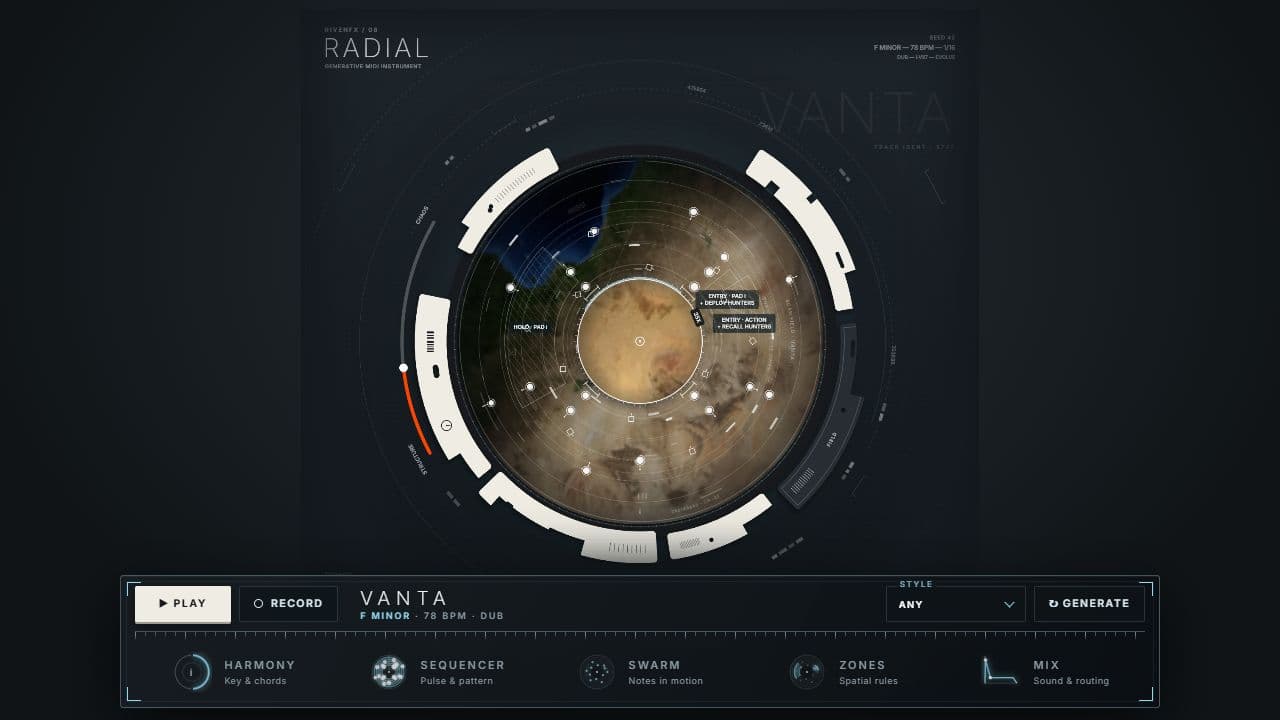
A generative MIDI instrument. Write notes on orbiting lanes. Release a flock that plays as it moves. Draw zones that turn regions into rules. Then blend the written score with the emergent performance, and send all of it to the instruments you already own.
Five orbital lanes carry your written notes. A scanning arm sweeps the disc once every four bars and plays whatever it crosses. Each lane can turn at its own ratio, so simple parts interlock into longer phrases. Rotate a lane and its timing moves with it.
VELOCITY · GATE · CHANCE · RATCHETS
DETERMINISTIC AT 100%
EDIT ON THE DISC
02 / SWARM
A flock, not a random number.
Up to 32 boids move through the field with real flocking forces. Cohesion draws them together. Separation keeps them apart. Structure pulls them into repeatable formations; turbulence breaks them loose. Every boid is a voice: its distance from the centre chooses the pitch, or assign each one a note. Musical spacing keeps the collisions intentional.
FREE · FLOCK · LOCKED · SCATTER
PITCH BY POSITION
ONE TRIGGER PER ⅛ NOTE
03 / ZONES
Turn a region into a rule.
Draw an arc on the disc. On entry, play a note or a chord. While the swarm stays inside, hold a pad that follows the chord chart. Or make it a dampener that quietens the field. Zones can also act: deploy the hunters, scatter the flock, add a boid or remove one. The swarm changes the scene as it moves.
ENTRY · HOLD · DAMPENER
PADS FOLLOW THE CHART
UP TO SIX ZONES
04 / HUNTERS
Pursuit becomes bass.
Orange hunters chase the flock across the disc, leading their targets like something that has done this before. Every catch plays a sub-bass note on its own channel, quantised to the beat. Deploy them from a zone, recall them, or leave them standing down.
INTERCEPT PURSUIT
ONE CATCH PER BEAT
OWN MIDI CHANNEL
05 / STRUCTURE → CHAOS
Control. Then let go.
One arc blends the written sequence with the emergent performance. Fully left, only your notes play. In the centre, everything. Fully right, the swarm, zones and hunters carry the piece. Behind it, a conductor develops your motifs in four-bar phrases, builds and releases energy, and modulates keys across movements that resolve home.
ONE ARC · WHOLE PERFORMANCE
SECTIONS → MOVEMENTS → PIECES
SWITCH ANY OF IT OFF
RFX08 / SCANNER · SILENT PREVIEWFULL FIELDMIDI OUT · SEQ / SWARM / ZONES / HUNTERS
IT PLAYS YOUR INSTRUMENTS
Radial makes no sound of its own.
It sends MIDI. Route each part to any instrument track in your DAW, on its own channel, so every layer gets its own sound. The editable score is saved with your session, and the engine keeps composing with the editor closed.
01SEQUENCERThe written lanes. Your lead voice, keys or plucks.
02SWARMFlock triggers. Bells, mallets, anything that likes a scatter of notes.
03ZONESEntry notes and held pads, voiced to follow the chord chart.
04HUNTERSEvery catch, on the beat. Send it to a sub.
SEVEN STYLES OF SONG DNA
BERLIN
DRIFT
PULSE
DUB
AURORA
CLOCKWORK
NOCTURNE
Each style seeds the lanes, the harmony and the motion differently. Same seed, same track, the same endless evolution, every time you open the session.
A CONDUCTOR, IF YOU WANT ONE
Sections become movements become pieces.
Motifs develop in four-bar phrases: statement, variation, answer, return. Energy builds and releases. Keys modulate across movements and resolve home. Switch any of it off and the written score plays exactly as written.
Demo behaviour. Demo MIDI pauses briefly at intervals. MIDI-file export requires activation. Radial needs a destination instrument and a DAW that supports MIDI output from a VST3 instrument; it does not supply a synth sound in your audio track.
THE INSTRUMENT
The full interface, in your DAW.
The preview above is a silent visual port of the radial view. The plugin adds the performance dock, the harmony, sequencer, swarm, zone and mix editors, and the on-disc inspectors that make every element editable.
Windows builds are 64-bit VST3. Mac builds are universal for Apple silicon and Intel, in VST3 format. Check the compatibility and installation guide before buying.
Windows requires Microsoft WebView2. Mac uses its built-in WebKit and needs no separate web runtime. Mac downloads currently use local signing and are not Apple-notarized; see the Mac installation notes.
Try it with your own session
Demo MIDI pauses briefly at intervals. MIDI-file export requires activation. Radial needs a destination instrument and a DAW that supports MIDI output from a VST3 instrument; it does not supply a synth sound in your audio track.